
Hello National CORE,
As part of our ongoing commitment to ensure the optimal performance and security of our computer systems, we are notifying you of an upcoming system policy that will automatically reboot your computer. This computer reboot policy will be implemented starting Friday, March 8.
These automatic reboots will only occur after a software update and/or security patch has been applied to your system, where a reboot is necessary to complete the installation. This proactive approach is crucial to maintaining a secure environment for all National CORE users and systems.
What you should Expect:
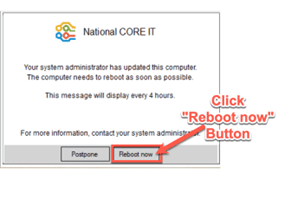
Reboot Notification #1: Upon completion of a software update and/or security patch being applied to your system, if a reboot is necessary, a reboot prompt will be displayed in the bottom right corner of your screen. We encourage everyone to take this initial opportunity to reboot your system. To avoid any data loss, please save your work and close any open applications before you reboot your system. If you’re unable to reboot your system, you will have the option to postpone the reboot for 4 hours.
Example of the Reboot Prompt #1:

Reboot Notification #2: If the system reboot is postponed after the first notification, a second notification will be issued. Again, we encourage everyone to take this opportunity to reboot your system. To avoid any data loss, please ensure that you save all your work and close any open applications before you reboot your system. If you’re still unable to reboot your system, you will have the option to postpone the reboot one final time for 4 hours.
Example of the Reboot Prompt #2:
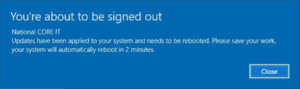
- Final Reboot Notification: If you have postponed the reboot of your system 2 times you will receive a third notification. The third notification will not include a postpone option and will reboot after 2 minutes regardless of if your work has been saved. Your data may be subject to loss or corruption if your data was not previously saved.Example of the Final Reboot Prompt:
Why is this Necessary?
Security Updates: System reboots are essential to apply the latest security updates to protect your computer and data from potential cyber threats.
Performance Optimization: Regular system updates help to ensure optimal performance and improves overall system efficiencies.
How Can You Get Help?
When possible, take the first opportunity to reboot your system when prompted.
It is also a good practice at the end of your workday to save your files, close all open applications and shut your system down.
We appreciate your understanding and cooperation in this matter. Our goal is to provide you with a secure and reliable computing environment. Thank you for your continued support.
Kind regards,
Todd Kemp
Vice President of Information Technology